

Overview
One of the most powerful applications enabled by LLMs is sophisticated question-answering (Q&A) chatbots. These are applications that can answer questions about specific source information. These applications use a technique known as Retrieval Augmented Generation, or RAG. This tutorial will show how to build a simple Q&A application over an unstructured text data source. We will demonstrate:- A RAG agent that executes searches with a simple tool. This is a good general-purpose implementation.
- A two-step RAG chain that uses just a single LLM call per query. This is a fast and effective method for simple queries.
Concepts
We will cover the following concepts:- Indexing: a pipeline for ingesting data from a source and indexing it. This usually happens in a separate process.
- Retrieval and generation: the actual RAG process, which takes the user query at run time and retrieves the relevant data from the index, then passes that to the model.
The indexing portion of this tutorial will largely follow the semantic search tutorial.If your data is already available for search (i.e., you have a function to execute a search), or you’re comfortable with the content from that tutorial, feel free to skip to the section on retrieval and generation
Preview
In this guide we’ll build an app that answers questions about the website’s content. The specific website we will use is the LLM Powered Autonomous Agents blog post by Lilian Weng, which allows us to ask questions about the contents of the post. We can create a simple indexing pipeline and RAG chain to do this in ~40 lines of code. See below for the full code snippet:Expand for full code snippet
Expand for full code snippet
Setup
Installation
This tutorial requires these langchain dependencies:LangSmith
Many of the applications you build with LangChain will contain multiple steps with multiple invocations of LLM calls. As these applications get more complex, it becomes crucial to be able to inspect what exactly is going on inside your chain or agent. The best way to do this is with LangSmith. After you sign up at the link above, make sure to set your environment variables to start logging traces:Components
We will need to select three components from LangChain’s suite of integrations. Select a chat model:- OpenAI
- Anthropic
- Azure
- Google Gemini
- AWS Bedrock
- HuggingFace
- OpenRouter
- OpenAI
- Azure
- Google Gemini
- Google Vertex
- AWS
- HuggingFace
- Ollama
- Cohere
- MistralAI
- Nomic
- NVIDIA
- Voyage AI
- IBM watsonx
- Fake
- Isaacus
- In-memory
- Amazon OpenSearch
- AstraDB
- Chroma
- Milvus
- MongoDB
- PGVector
- PGVectorStore
- Pinecone
- Qdrant
1. Indexing
This section is an abbreviated version of the content in the semantic search tutorial.If your data is already indexed and available for search (i.e., you have a function to execute a search), or if you’re comfortable with embeddings and vector stores, feel free to skip to the next section on retrieval and generation.
- Load: First we need to load our data into
Documentobjects. - Split: Text splitters break large
Documentsinto smaller chunks. This is useful both for indexing data and passing it into a model, as large chunks are harder to search over and won’t fit in a model’s finite context window. - Store: We need somewhere to store and index our splits, so that they can be searched over later. This is often done using a VectorStore and Embeddings model.
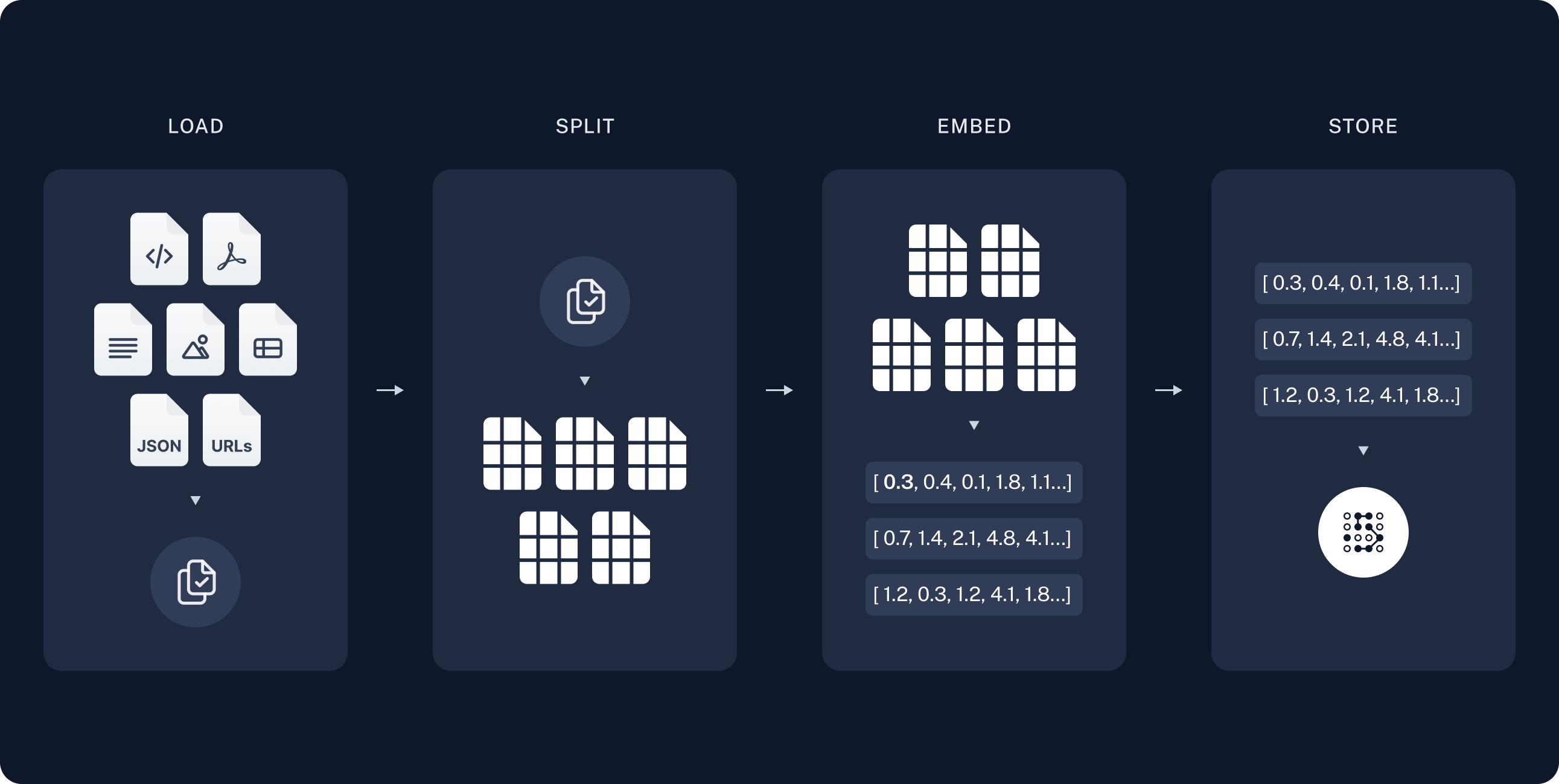
Loading documents
We need to first load the blog post contents into a list of Document objects. We’ll userequests to fetch the page and BeautifulSoup to parse it to text. We can customize the HTML -> text parsing by passing in parameters into the BeautifulSoup parser via bs_kwargs (see BeautifulSoup docs). In this case only HTML tags with class “post-content”, “post-title”, or “post-header” are relevant, so we’ll remove all others.
Splitting documents
Our loaded document is over 42k characters which is too long to fit into the context window of many models. Even for those models that could fit the full post in their context window, models can struggle to find information in very long inputs. To handle this we’ll split theDocument into chunks for embedding and vector storage. This should help us retrieve only the most relevant parts of the blog post at run time.
As in the semantic search tutorial, we use a RecursiveCharacterTextSplitter, which will recursively split the document using common separators like new lines until each chunk is the appropriate size. This is the recommended text splitter for generic text use cases.
TextSplitter: Object that splits a list of Document objects into smaller
chunks for storage and retrieval.
- Integrations
- Interface: API reference for the base interface.
Storing documents
Now we need to index our 66 text chunks so that we can search over them at runtime. Following the semantic search tutorial, our approach is to embed the contents of each document split and insert these embeddings into a vector store. Given an input query, we can then use vector search to retrieve relevant documents. We can embed and store all of our document splits in a single command using the vector store and embeddings model selected at the start of the tutorial.Embeddings: Wrapper around a text embedding model, used for converting text to embeddings.
- Integrations: 30+ integrations to choose from.
- Interface: API reference for the base interface.
VectorStore: Wrapper around a vector database, used for storing and querying embeddings.
- Integrations: 40+ integrations to choose from.
- Interface: API reference for the base interface.
2. Retrieval and generation
RAG applications commonly work as follows:- Retrieve: Given a user input, relevant splits are retrieved from storage using a Retriever.
- Generate: A model produces an answer using a prompt that includes both the question with the retrieved data
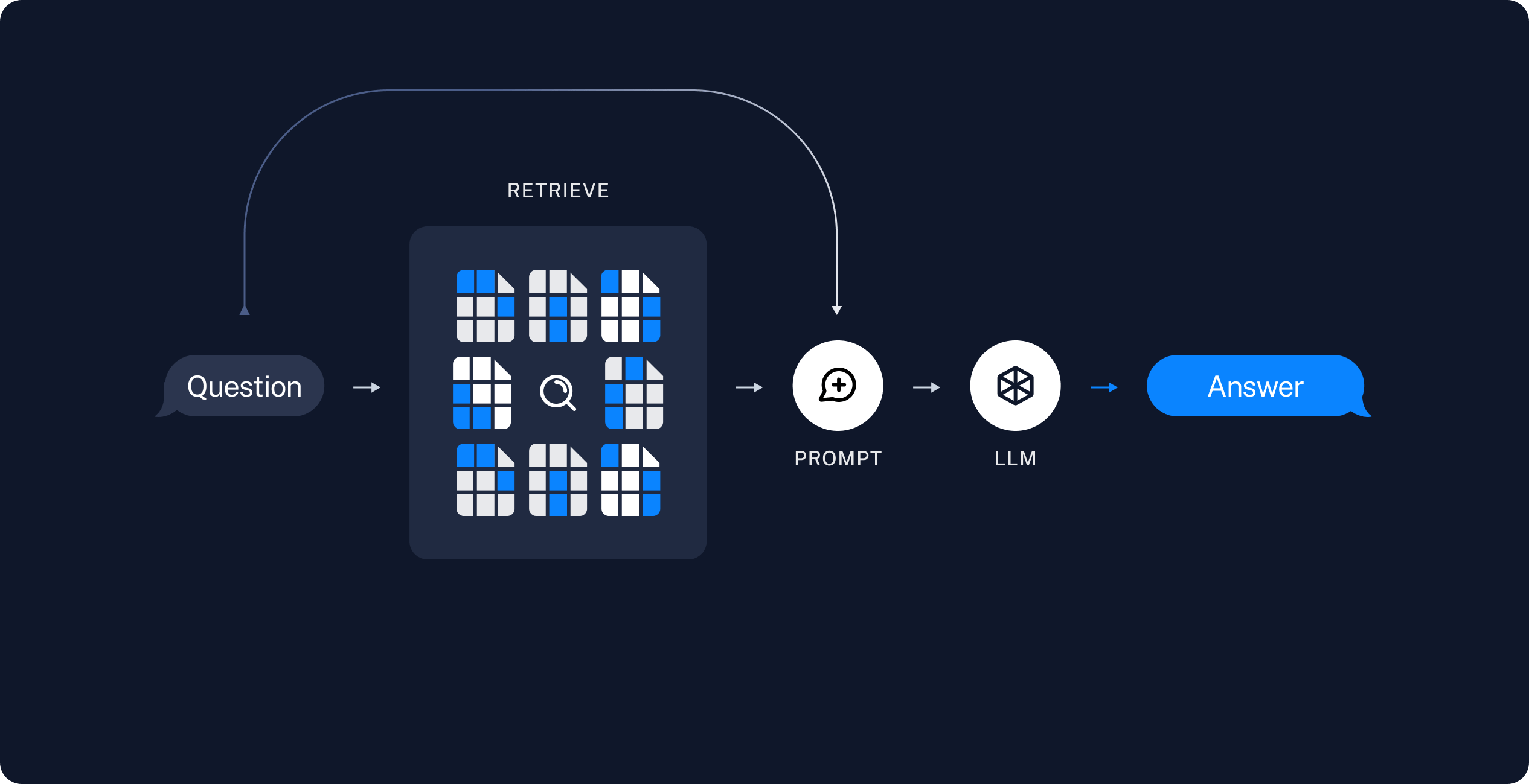
- A RAG agent that executes searches with a simple tool. This is a good general-purpose implementation.
- A two-step RAG chain that uses just a single LLM call per query. This is a fast and effective method for simple queries.
RAG agents
One formulation of a RAG application is as a simple agent with a tool that retrieves information. We can assemble a minimal RAG agent by implementing a tool that wraps our vector store:- Generates a query to search for a standard method for task decomposition;
- Receiving the answer, generates a second query to search for common extensions of it;
- Having received all necessary context, answers the question.
RAG chains
In the above agentic RAG formulation we allow the LLM to use its discretion in generating a tool call to help answer user queries. This is a good general-purpose solution, but comes with some trade-offs:
Another common approach is a two-step chain, in which we always run a search (potentially using the raw user query) and incorporate the result as context for a single LLM query. This results in a single inference call per query, buying reduced latency at the expense of flexibility.
In this approach we no longer call the model in a loop, but instead make a single pass.
We can implement this chain by removing tools from the agent and instead incorporating the retrieval step into a custom prompt:
Returning source documents
Returning source documents
The above RAG chain incorporates retrieved context into a single system message for that run.As in the agentic RAG formulation, we sometimes want to include raw source documents in the application state to have access to document metadata. We can do this for the two-step chain case by:
- Adding a key to the state to store the retrieved documents
- Adding a new node via a middleware hook such as
before_modelto populate that key (as well as inject the context).
Security: indirect prompt injection
To mitigate this:- Use defensive prompts: Explicitly instruct the model to treat retrieved context as data only and to ignore any instructions within it. The prompts in this tutorial include such instructions.
- Wrap context with delimiters: Use clear structural markers (e.g., XML tags like
<context>...</context>) to separate retrieved data from instructions, making it easier for the model to distinguish between them. - Validate responses: Check that the model’s output matches the expected format (e.g., plain text) and handle unexpected formats gracefully.
Next steps
Now that we’ve implemented a simple RAG application viacreate_agent, we can easily incorporate new features and go deeper:
- Stream tokens and other information for responsive user experiences
- Add conversational memory to support multi-turn interactions
- Add long-term memory to support memory across conversational threads
- Add structured responses
- Deploy your application with LangSmith Deployment
Connect these docs to Claude, VSCode, and more via MCP for real-time answers.